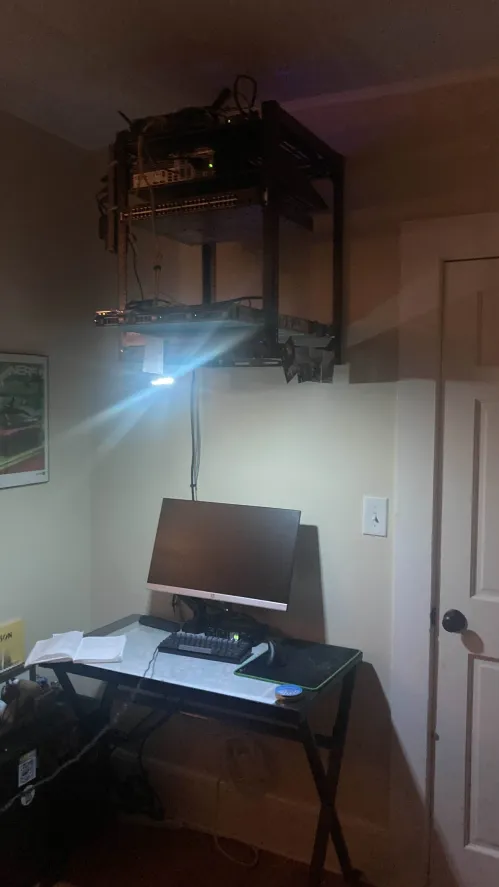
the sword of damocles
Postmortem for a RAID migration on my Dell Poweredge R320 lovingly referred to as ‘The Sword of Damocles’.
It sits above my desk and it just barely grazes my hair when I stand up.
Before
I originally stood the server up with 2 1TB drives in a RAID 0 (Redundant Array of Independent Disks) while waiting for the rest of my hard drive bays in the mail. A hard drive failed during this time and since RAID 0 is only striping, the RAID array could not be rebuilt and data was lost.
That experience informed my decision to migrate to RAID 5, so I could rebuild from parity in the case of a single drive failure. I chose not to use all 4 of my drives in a RAID 10 array, since having a spare drive is desirable for cheap storage upgrades. If I was upgrading the capacity in RAID, I would need to buy 4 drives and go through the rebuild process before extending the partition into the empty space. Partial upgrades don’t work in RAID because data is written across all disks and there’d be no redundancy for the disk locations that don’t have an equivalent spot on all other disks.
The spare drive would likely hold movies and music, so redundancy isn’t a chief concern.
I also installed upgraded memory during this time.
During
All things considered the RAID migration itself went pretty well, even though it took a long time. I just accessed the hardware RAID controller settings during system startup and submitted the operation. No sweat.
Then calamity struck. The server wouldn’t boot after the migration and it got stuck in initramfs shell. I could see my root filesytem, but it wouldn’t boot into it for whatever reason. You would expect the migration to not cause any trouble since the root filesystem was already behind the RAID controller. Regardless, toggling virtualization options in the UEFI didn’t work. Neither did changing kernel versions in the GRUB bootloader. At this point in the troubleshooting process I was irritated and thought something was wrong with the volume group created by the RAID controller (not true considering the filesystem was accessible). I ended up remaking the volume group which is a destructive process and attempted to reinstall Proxmox which holds all of my virtual machines.
The Proxmox installation wizard could see volume group and would attempt to install there, but would bug out and quit after meeting a timeout duration. Restarting the installation with the debug option enabled revealed the following error:
DMAR: [DMA Read NO_PASID] Request Device [01:00.0] fault addr 0x7d77000 [fault reason 0x06] PTE Read access is not set
Great. Looking up the error led me down a couple rabbit holes, one of which was an actual kernel bug that effected a different version than mine. Eventually a forum post revealed itself to me, instructing that i add ‘intel_iommu=on’ and ‘intel_iommu=pt’ into the GRUB bootloader config. I added these magic options to the config and Proxmox installed and booted properly. I call them magic options because none of the forum posts or blogs ever explain why the problem exists and why enabling IOMMU passthough works. From my understanding the problem stems from the DMA (Direct Memory Access) controller. The CPU delegates to the DMA controller data transfer management between storage device and memory. The storage device in this case is my hardware RAID controller. In a virtualization context I think the DMA controller is also responsible for some kind of virtual -> physical address translation, too. DMA is also used by the hypervisor for its own memory operations to isolate memory spaces for each PCI device. Enabling IOMMU (Intel’s name for a DMA controller) passthrough skips the translation steps and provides access to physical addresses. There are some memory integrity and security ramifications to this. The error message leads me to believe that it’s a permissions issue, but this needs to be researched further as I don’t know why it broke and why its fixed now. Maybe something about IOMMU groups?
Now with a working Proxmox installation, I quickly set everything up the way it was beforehand in preparation to restore my minecraft server from backup. I could mount the disk and read the filesystem contents, but there was some corruption and I couldn’t pull the backup off the drive. I suspect a disk write operation was interrupted while I was power cycling the server to troubleshoot the boot error. Fortunately the server just began and people weren’t too upset about losing their progress.
After
I now take backups more often and am less cavalier with destructive operations. The minecraft server is going well and I hope to use the Proxmox hypervisor further to host a media server and weather station. These additions will also come with some server configuration changes. I want to put the hypervisor on a different subnet than my home traffic and I also want to get intrusion prevention and log forwarding setup. Those last two involve learning NixOS, so I can declare those configurations once and have them shared across all my virtual machines.